

The original of this article was posted at:
https://steptoesyard.wordpress.com/2015/06/18/dell-fx130-thin-client-linux-internet-radio/
The website has since vanished. At the time of writing (April 2018) some articles could still be found on the Wayback machine. I have also archived the text here. If you think it should be removed please email me using the link at the bottom of the page.
Posted: June 19, 2015
I keep looking on Evilbay for cheap thin clients and computers, buying them if they are going for next to nothing, when a cheap Dell FX130 came up. I'd been keeping my eye out for something for a while for an internet radio build to go in the kitchen. Had previously built something but had no gui control and was therefore not Missus Friendly (ie operatable by the other half)
I was therefore tasked to come up with something that would turn on, go to a selection of radio stations, play one when selected and turn off when not needed. It also needed to be small and low power and be operated by a mouse only, so this thin client fits the bill perfectly! The specs for this (and a lot of other machines) can be found on the excellent ParkyTowers website. LINK The specs for the FX130 are HERE.
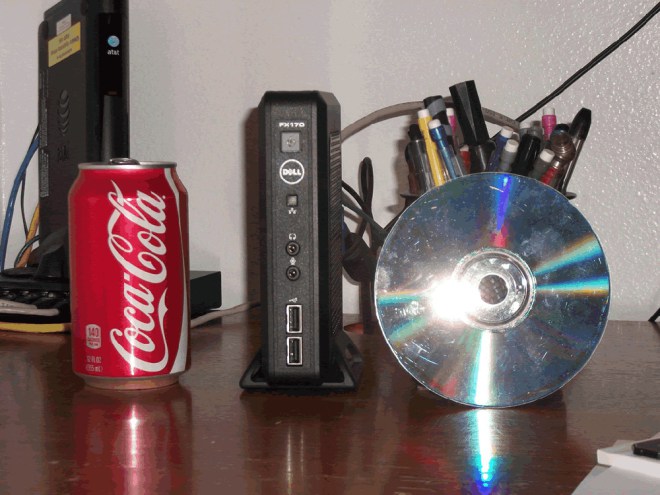
The picture isn't mine (if it's yours and you want it removed email me), but it shows the size of the box (the eagle eyed might note that it's a FX170, they are physically the same size)
First of all I installed Tiny core linux to the hard disk (DOM), then installed alsa, alsa mixer, VLC and Firefox . I could not get the box to play any sounds, despite playing with the alsa config, and the alsamixer showing the outputs as working so after a while gave up with it. I will revisit this at some point with a USB installation and try to get it to work.
In the meantime, I installed Slitaz to the hard disk, formatting the DOM to ext2. Happily the audio worked out of the box. Also installed were VLC, Firefox and Xbindkeys
Slitaz brings up a login screen by default, to remove this use leafpad to edit /etc/slim.conf. Find the line "default_user Radio" (or whatever name you used during install) and add the line "auto_login yes" below it. Save and restart. Also, by default there is a ten second delay within Grub to allow you to choose an operating system, I set this to nothing in boot/grub/menu.lst for a faster boot time.
I then configured Firefox to open in full screen and set the homepage to listenlive.eu. Once on the listenlive page i clicked various links to set the file associations to be opened by VLC. Once done if you close Firefox then reopen it will save the settings. I also noted that Firefox tries to restore a previous session instead of opening my homepage. To disable this in the about:config screen find "browser.sessionstore.resume_from_crash" and set it to false. Finally I added Firefox to the list of startup applications (System settings > Advanced > Autostart > Add Program)
I also found that clicking a link would open the particular station in VLC but it would always pop up above Firefox. To fix this I autostarted VLC, using "vlc -qt-start-minimized&" in the Add Program box mentioned above. This autostarts it in the try where it remains. You also need to go into the VLC options and check "Only allow one instance of VLC" otherwise you will get multiple stations playing if you click several links.
To get it to shut down as there was no keyboard and Firefox was in full screen I tried to configure ACPID to use the power button but didn't have any success. The easiest solution that I found was to install Xbindkeys (and set it to autostart) Once you have created a default file it was edited to take a press of the Power button to run Shutdown.
The only other thing that I wanted was for the screen to blank after a period of inactivity as once a station was selected there would be no need for it, so adding "xserver_arguments dpms" to the etc/slim.conf file enabled this.
The test of this was the Misuse - Pressing the power button boots and brings up ListenLive in Firefox in full screen, clicking a link plays a song using VLC with powered external speakers handling the sound. Once finished a quick press of the power button turns the whole thing off. To say that there have been no complaints is a glowing endorsement and it is happily sat in the kitchen now churning out tunes.
Any questions or comments welcomed.....