The label on the side of this unit identifies it as an Igel 3/4 which is not much use as they use different numbers and names in their literature. I find Igel's labelling extremely unhelpful and there is also a lack of information on their website on older models to help you identify exactly what you've got your hands on. Luckily their distributors are slower about deleting brochures on old models. Another thing that didn't help here was that the flash memory had been wiped - so I got no handy model number from that!
After I little research, I decided this was one of the Compact model range. The initial models comprised the 3200 CE, 3200 LX and 3600 XP. These used a 550MHz VIA Eden CPU. (The data sheet doesn't identify the Northbridge chip but I think it was a CLE266). Subsequently there were the 3210 CE, 3210 LX and 3210 XP. The CPU clock rate was uprated to 600MHz and the Northbridge chip was the CN700. One of the serial ports was removed and replaced with a DVI connector in addition to the normal VGA connector.
As it has a 600MHz CPU, 128MB Compact Flash card, a Microsoft Windows sticker and a DVI port, mine is a 3210 CE model.
The photograph above on the right compares it with the 2100. It's wider and just slightly taller so maybe 'compact' is a suitable name when you compare it to the Winestra range which is significantly larger. Also in the photo you'll notice my unit is missing the cover over the USB port.
There is nothing on the hardware that indicates the date of manufacture. However IGEL's website does give the following support information:
Model End-of-life End-of-maintenance Final Firmware 3200 CE Compact 31.12.2006 31.12.2009 5.04.016 3200 LX Compact 31.12.2006 31.12.2009 3.10.100 3600 XP Compact 31.12.2006 31.12.2009 1.04.100 3210 CE Compact 31.01.2009 01.02.2012 3210 LX Compact 31.01.2009 01.02.2012 3610 XP Compact 31.01.2009 01.02.2012
The basic specs for the 3210 CE are:
Processor Type
SpeedVia C7
600MHzMemory Flash
RAM128MB
256MB (max 1GB)Video Chip
Max resolution
VGA
DVIVia CN700
1920 x 1440 24-bit colour
1600 x 1200 24-bit colourPorts Video
Network
USB
Serial
Parallel
PS/2DVI & VGA
10/100
1 x USB2.0 front
2 x USB2.0 rear
1
1
Kybd & MousePower Off
Running7W
19WDimensions W x H x D 4.3cm x 24.0cm x 22.5cm
For those to whom it matters here is some detail from Linux's /proc/cpuinfo
vendor_id : CentaurHauls cpu family : 6 model : 13 model name : VIA Eden Processor 600MHz stepping : 0
The IGEL 3210 CE has an internal power supply. The mains connector is a standard IEC connector.
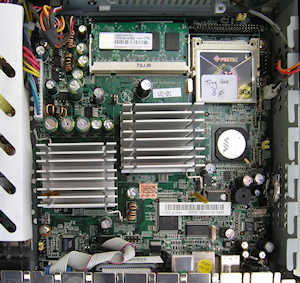
Both the Flash memory and the RAM in the 3210CE are easily replaceable.
Flash: The flash memory is a Compact Flash card plugged into a socket adjacent to a 44-pin IDE connector.
RAM: There is a single 200-pin DDR2 SODIMM socket for the RAM. The 256MB DIMM supplied with the unit is labelled: 256MB DDR2 533 192036-4165 and is manufactured by Transcend. I have successfully upgraded this to 512MB (Hynix HYS64T64020HDL-3S-B and a Transcend 512M DDR2 533 SO-DIMM CL4) and to 1GB (Samsung M470T2953EZ3-CE6). A 2GB part did not work - but I didn't expect it to as I believe the CN700 only supports a maximum of 1GB per SODIMM. (See here).
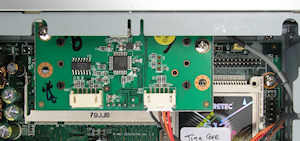
Smartcard: The system is also fitted with a smartcard reader. This is internally connected to the fourth USB port. Note: The smartcard reader normally fits just above the RAM and partly over the 44-pin IDE connector/CF card - you can see one of the mounting points there on the front metalwork. The other is slightly recessed but partly visible towards the left-hand end of the SODIMM. I temporarily removed the reader when I was taking the photograph. That area of the board with the reader refitted is shown in the photograph below.
If you want to fit an internal drive then there are a number of possibilities:
In the latter two cases you'll need to be inventive in how you mount the drive.