In June 2026 I heard from Neil who let me know what he had
been up to with his M340C:
After playing around with Puppy Linux for a while and reading about what others have done
with their thin clients I decided to push the boat out and see just what my M340C was capable of.
The answer: much more than you'd think!
(Thanks again for your excellent site. It is an enabler - it certainly enabled me to get
the most out of my Igel M340C).
I've ended up with a full install of Debian Trixie with Xfce.
This is working well. By well, I mean I use the machine as my daily driver for web surfing,
email, and web development in Wordpress. No problem.
What do I miss? Not a lot. Applications load a little more slowly, and I can't watch iPlayer
or youTube at 1080p. I can at 720, which is fine for much of the time. In fact it's actually a
benefit as I'm less easily distracted!
So, what have I done to the M340C?
In practice not a lot and nothing particularly complicated. I upped the system memory to 8GB
and upped the storage to 256GB.
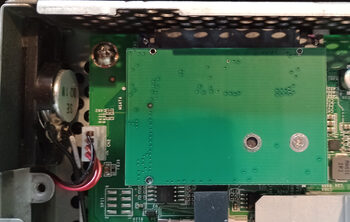
Unfortunately, there was no hidden mSATA socket underneath the DOM so
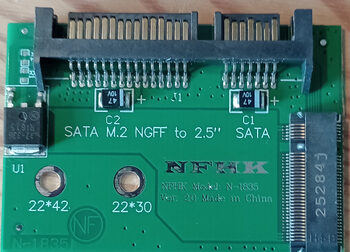
I got a SATA M.2 NGFF to 2.5" adapter off eBay.
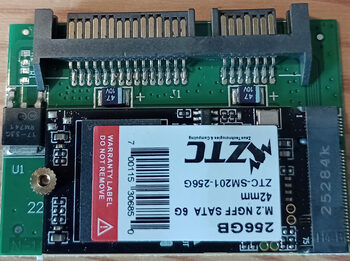
The M.2 adapter came with a 16GB M.2 SATA module but I replaced that with a 256MB one. This
was a 'drop in' to the adapter which in turn fitted perfectly into the SATA slot on the M340C.
A small oddity was that it ended up upside down when plugged in to the SATA connector.
Anyway, I reckon I'll save money over the year using the wee Igel for most of the time:
my desktop machine runs 4 SATA 3.5" drives, 3 NVME drives, 32G of RAM, an nvidia RTX 3060
video card and a Ryzen 7 16 core machine. When I'm using it normally, it sits at 5% activity or
less - usually much less - and I guess was consuming about 130W just keeping itself going. At 10W
the Igel stands to be a significant improvement.
I have to say, I'm mightily impressed with what the Igel can do. I honestly don't miss
the desktop when I'm working on the machine.
He later added:
Some minor points: I turned off hardware acceleration for Brave Browser, and used Xfce tweaks
to turn off previews in Thunar: the latest Linux kernel isn't great
with the older generation Radeon
GPU. I actually upgraded from Debian 12, which had no problems with the Radeon chip. With those
changes I can run between 60°C and 65°C as long as I don't have too many browser windows open
- the intense JavaScript on the AliExpress site is a killer!