

On power up the ESC key gets into the opening menu:
Startup Menu Continue Startup System Information Change Language Diagnostics (F2) Boot Menu (F9) Computer Setup (F10) System Recovery (F11) Network Boot (F12) Utilities
My t730 was running BIOS L43 V01.15. Checking I found that the latest BIOS was L43 V01.16 Rev.A (sp132960.exe).
BIOS Update: I downloaded sp132960.exe and extracted the contents. As I had no installed OS it looked like I had two options to apply the update:
With the former you create a bootable USB which incorporates a UEFIshell utility which is designed to flash the System BIOS in a UEFI Shell environment.
With the latter you create a 'recovery disk' using the included file L43_0116.exe. My initial attempts to setup a ToolLess update did not get very far so I moved on to the 'F10' approach. Unfortunately running L43_0116.exe on my Windows 11 system brought up the error message:
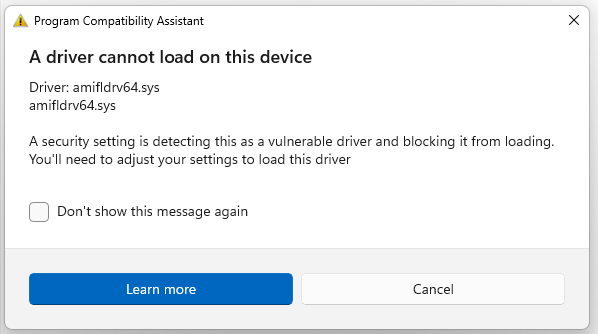
After a little bit of faffing about I dug out an old Wyse thin client that was running Windows 7 Pro and on this L43_0116.exe happily went ahead and created the rescue USB drive without any complaints. Having moved it across to the t730 that happily went ahead and installed the new BIOS.
The BIOS has all the usual settings and supports both legacy and UEFI booting.
As noted in the hardware section any BIOS password can be reset to removing jumper E49 (also labelled PSWD) and briefly rebooting the t730 before replacing the jumper.
Caveat When a password is set the user has the option (via menu option Security -> Password Options) to mark it as a 'Stringent Password'. If this is the case then jumper E49 is ignored by the BIOS and the password cannot be reset.